Handbook · Chapter 5 of 13
Chapter 5
🍽️ Tonight's Menu
One dish becomes a whole evening — menus, printable cards, and a minute-by-minute plan.
Updated September 22, 2026
On this page
5.1 Tonight's Menu5.2 My Menus5.3 A menu, in full5.4 The Cooking Game Plan5.5 Design and share a menu5.6 Complete the Meal5.7 Cook togetherTonight's Menu
Sprig ProA menu is one meal, composed: courses, a name, a card. Pick a main and Sprig suggests the rest of the evening — a soup, a side, a dessert that belong together. Accept, swap, or let it surprise you. The first time you Set the Table for a recipe, Sprig asks what kind of menu you want — Weeknight, Classic and more — and keeps that shape: add or swap courses as much as you like, the frame stays put. A meal on your calendar can become a menu with one tap, too. Until you save it, the menu is marked DRAFT — in the builder's header and on its card — and it waits for you on the recipe page and in My Menus.
📍 My Menus · open in Sprig →


Tap a picture to zoom
My Menus
Sprig ProEvery menu you build is saved under Menus on the Plan page — rename them, revisit them, cook them again. Each card says what it's linked to: "On Thu, Sep 17" when its dishes are on your calendar, "Game plan ✓" when it has a timed plan, and either chip takes you there. Press and hold a menu to put every dish on a day in one go, or to move the whole evening to another day — its game plan moves with it. Menus made from a meal on your calendar — "Tuesday dinner" — wait in a group of their own at the bottom, so the ones you composed stay in front.
📍 My Menus · open in Sprig →
Tap a picture to zoom
A menu, in full
Sprig ProOpen a menu to see every course with its recipe, servings that scale together, and one-tap ways to shop it, plan it, or share it.
📍 My Menus · open in Sprig →

Tap a picture to zoom
The Cooking Game Plan
Sprig ProThe hard part of a dinner party isn't any one dish — it's the timing. The Game Plan interleaves every course into one minute-by-minute schedule, working backwards from when you want to eat. Plan settings sit in one line under Start the plan — tap Edit to change the day (any day, months ahead), the serving time (any quarter hour, morning or night), two-day prep, and who's cooking, then Save. Changing the day or the time never re-plans: the day is simply saved, and a new serving time moves every step by the same amount, so who does what and what's already ticked stay exactly as they were. Only a change of shape — spreading over two days, or a dish added to the menu — asks Sprig to plan again, and it says so. The timeline and the oven are open beneath. The ⋯ in the corner prints or shares the plan — the whole thing, or one chef's own list — and deletes a plan for good when you're done with it. Your printed copy — the kitchen copy — is right there too: on a wide screen it sits beside the plan and redraws as you change the serve time or hand off a step; on a phone, tap the Kitchen copy strip to see it full size. Switch it to Everyone, You or a helper to see exactly what each person gets, then Share or print, Save it as an image, or change its Design — it follows the menu card's style.


Tap a picture to zoom
Design and share a menu
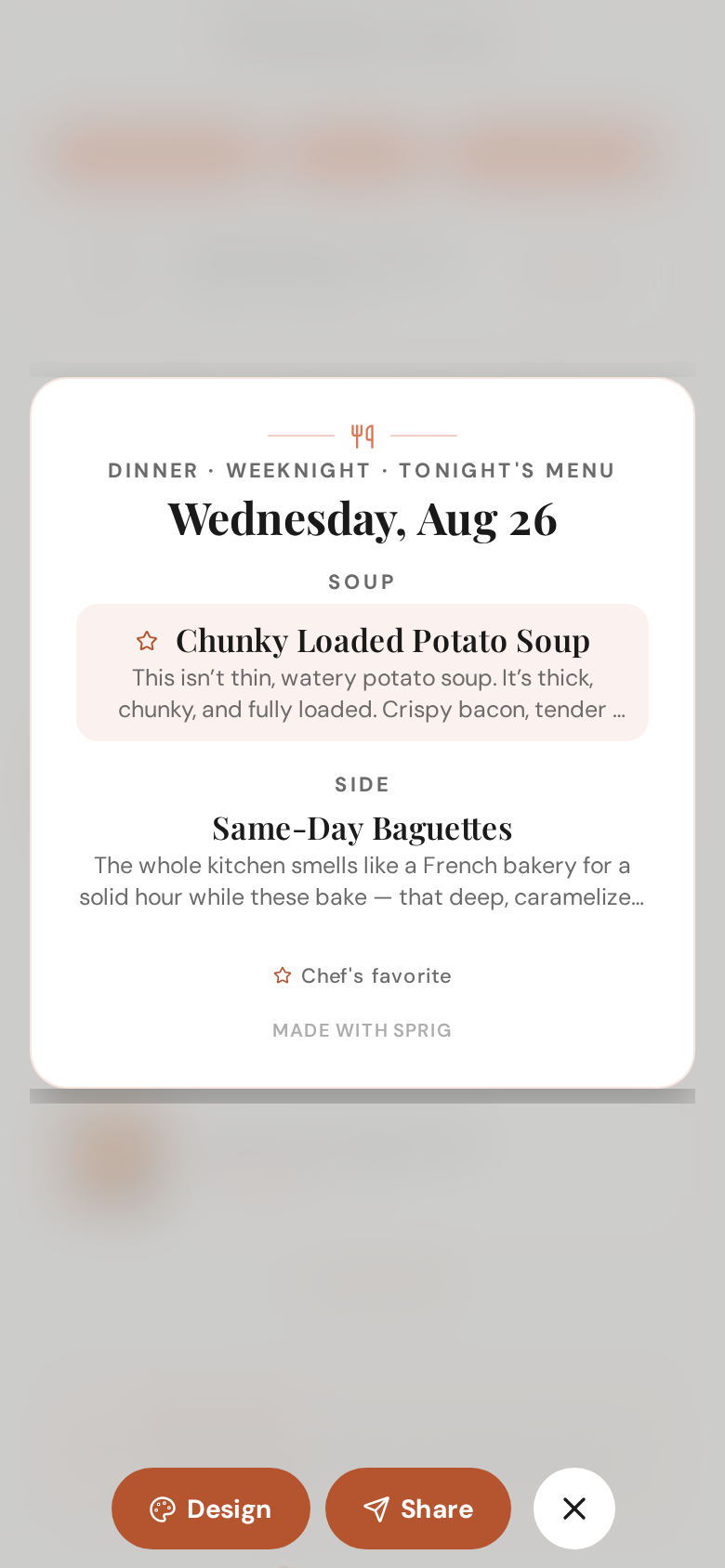
Sprig ProA menu page is where you build the menu: your dishes start on the first screen, with Cook again, Shuffle (it reads Suggest on a menu you built by hand), Design and Share just above them. The card — the printed one, typeset like a restaurant's — is a slim strip on a phone; tap Preview to see it full size. On a wide screen it sits beside you and redraws as you change it. Tap any dish on the card and its recipe opens. Want a dish noticed? Open its ⋯ menu and Star it — as many dishes as you like, and nothing is starred until you choose. Each starred dish gets a ★ on the card and a badge in the list, and one key line at the foot explains it in your words: “Chef's favorite” to start, or pick Crowd favorite, Grandma's, New this week or your own under Design › Star label. Under Design choose Classic, Modern or Handwritten, add a note under the title, a drink pairing, prices or a small photo beside each dish, and keep or drop the Sprig line at the foot (Sprig branding is on unless you turn it off); every change is saved the moment you tap it, and what you see is exactly what prints. Share leads with the link; below it the card as a PDF, an image or a story — in a browser these download to your computer — a QR code for the recipes, and a switch to show the menu on your public profile. Before a link or a QR code goes out, Sprig shows which dishes are still private and offers to publish them.
📍 My Menus · open in Sprig →


Tap a picture to zoom
Complete the Meal
Sprig ProYou don't have to start from My Menus. Scroll to the bottom of any recipe and tap Set the Table — Sprig rounds the dish out into a whole evening with a starter, a side, a dessert and a drink, pulled from your library, the community, and a few fresh ideas.


Tap a picture to zoom
Cook together
Sprig ProCooking with someone? Add them under "Who's cooking?" before you plan, then say who does what: every dish starts with you, and you hand dishes over by tapping a name (or tap Let Sprig split it and it decides, once). Sprig then writes the day around your choices — a lane each, work running side by side around the one oven — and never moves a dish between people on its own. Who does what shows each chef with their dishes — tap a dish to hand it over, or tap a step's dot to move just that one. Each helper gets their own link, or a QR to scan across the kitchen: a page with their next job and a countdown, a big Done button, everyone's progress, and Running late. On your phone the kitchen strip shows every chef's progress, your next step says who you're waiting on, and your reminders are for your steps only. If a helper has Sprig and you follow each other, they show up under Your crew when you add chefs — tap them and Sprig invites them in the app instead of by link. They get the invite in their bell, tap Accept, and their jobs, timers and reminders live on their phone; their lane on your plan reads Invited, then In the app (or Can't make it — a link is still one tap away). Everyone you're helping is listed under Cooking with… on the Game Plans tab, and on the day it sits at the top of Home. Every dish on a helper's page — the strip at the bottom and the dish names on each job — opens the full recipe, with the same credit rules as your own shares; a helper who has Sprig can save any of them to their own library.


Tap a picture to zoom
Nothing in this chapter matches — try the Handbook search.
Made with Sprig
Tonight's Menu was created in Sprig — the AI chef that turns any craving into a complete recipe, plans your week, and shops with one smart list.